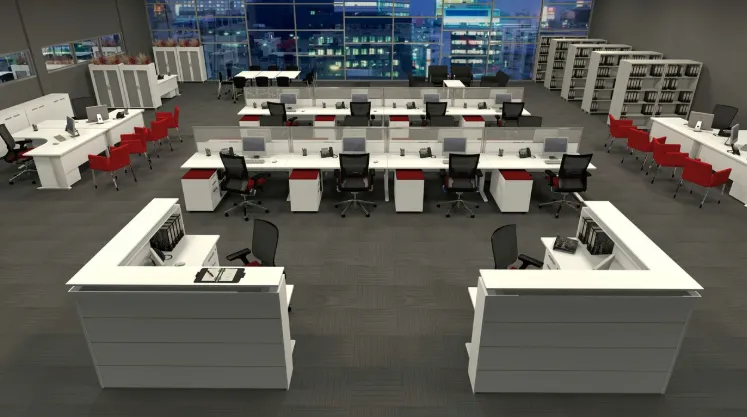
The way a workstation is set up determines what kind of work actually gets done there. It affects posture, focus, collaboration, and how much time is wasted moving between tasks. A study by the Ergonomics Society of Australia found that poor workstation design contributes to a 40% increase in fatigue-related errors over a standard workday. Modern office workstations are designed around how people actually work, not just where they sit.
What Makes a Workstation Layout Actually Efficient?
Efficiency comes from minimising the distance between tasks. Every time someone has to reach too far, turn awkwardly, or move to another area to complete a step, that’s wasted motion. In aggregate, these small inefficiencies consume significant time.
The most efficient layouts keep primary tools within a 30cm reach. Secondary items sit within arm’s length. Everything else gets stored further away. This approach, borrowed from industrial workflow design, translates directly to desk setup. When your monitor, keyboard, and mouse are in the right position, you stop compensating with your neck and shoulders.
How Does Desk Depth Affect Performance?
Most standard office desks are 600mm to 750mm deep. That’s enough for a single screen setup. But dual monitor configurations need at least 800mm, ideally 900mm, to position screens at the correct distance from the eyes.
The recommended monitor viewing distance is 50cm to 70cm from the face. If your desk doesn’t support that, you’re either pushing the screen too close, causing eye strain, or placing it too far, causing you to lean forward. A 2020 study from the Vision Council of America found that 65% of office workers reported digital eye strain symptoms. Desk depth is part of that problem.
Are Sit-Stand Workstations Worth the Investment?
The data says yes. A study published in the British Medical Journal found that workers who used sit-stand desks for 12 weeks reported a 32% reduction in musculoskeletal discomfort and a 17% increase in cognitive performance scores. Those are not marginal numbers.
Electric height-adjustable desks allow smooth transitions between sitting and standing without interrupting workflow. The recommended switch is every 30 to 45 minutes. The problem with manual cranks is that people don’t use them because the adjustment takes too long. Electric mechanisms remove that friction entirely.
How Much Space Does Each Workstation Need?
Safe Work Australia recommends a minimum of 7 to 10 square metres per person in an office environment. That includes circulation space, not just desk footprint. A workstation desk itself typically occupies around 1.4 to 1.8 square metres.
But this is a minimum, not a target. Workstations that are too close together create acoustic problems. Conversations bleed into each other. Phone calls become shared experiences. Cognitive performance on complex tasks drops when ambient noise levels exceed 55 decibels. Workstation spacing is partly a sound management decision.
What Cable and Technology Management Gets Overlooked?
Cable mess isn’t just ugly. It creates real hazards and practical frustrations. Tangled or unsecured cables around workstations are a tripping risk and cause equipment damage. They also slow people down when they need to rearrange or add devices.
Modern workstations should include integrated cable management trays under desk surfaces, grommet holes for cable routing, and power modules built into the desk frame. USB charging ports integrated into desk surfaces are now standard in well-designed commercial workstations. These features aren’t extras. They’re necessities in any technology-driven environment.
How Do You Design Workstations for Different Work Styles?
Not everyone works the same way. Some people need wide, clear desk surfaces with minimal overhead storage. Others work better with high side screens for visual privacy. Some roles require space for physical documents. Others are entirely digital.
The most effective approach is to offer workstation configurations that suit different work profiles rather than forcing a single template on every employee. Steelcase’s Global Report found that employees who have control over their work environment are 88% more engaged. Workstation design is part of that control.
What Are the Most Common Workstation Design Mistakes?
The most common mistake is buying desks based on price per unit without factoring in ergonomic adjustability, cable management, or expansion capacity. A cheap desk that can’t accommodate a second monitor or a monitor arm is obsolete before it’s even installed.
The second major error is ignoring acoustics. Open workstation layouts without any acoustic management create environments where focused work is nearly impossible. Acoustic panels, desk-mounted screens, and soft furnishing in nearby areas all help absorb sound. Workstation design and acoustic design are not separate problems. They’re the same one.

“Welcome to the ultimate destination for the best Instagram captions! I’m James, your go-to guide for crafting the perfect caption to match any moment. Whether you’re posting a selfie, a scenic shot, or a fun group picture, I’ve got you covered with creative, catchy, and relatable captions for every occasion. Dive into my collection and discover the perfect words to express yourself on Instagram!”